SocialStream.Ninja Integration with Streamer.bot
This guide explains how to integrate SocialStream.Ninja with Streamer.bot using WebSockets. This allows Streamer.bot to receive chat messages captured by SocialStream.Ninja and trigger custom actions based on them.
Integration Features
- Centralized Processing: Receive messages from various platforms supported by SocialStream.Ninja and process them within Streamer.bot.
- Custom Actions: Trigger any Streamer.bot action based on incoming messages (play sounds, show alerts, send messages to Twitch/YouTube, control OBS, etc.).
- Filtering/Routing: Use Streamer.bot's logic (C#, If/Else sub-actions) to handle messages differently based on platform, user, or content.
- Reliable Connection: Uses WebSockets for a persistent, low-latency connection.
Prerequisites
- Streamer.bot installed on your computer (v0.2.3 or higher recommended; v1.0+ has a redesigned UI)
- SocialStream.Ninja's Standalone app installed and configured
- Basic familiarity with Streamer.bot's interface (Actions, Sub-Actions)
Note: Streamer.bot v1.0 introduced a redesigned UI with dark mode. Menu locations may differ slightly from earlier versions. The WebSocket Server settings are typically found under
Settings →
Servers or similar. See the
official documentation for your version.
Setting Up Streamer.bot WebSocket Server
v1.0 Users: In Streamer.bot v1.0+, navigate to Settings (gear icon) → Servers → WebSocket Server. Earlier versions use Servers/Clients → WebSocket Server.
- In Streamer.bot, locate the WebSocket Server settings (see note above)
- Enable the server by checking Enabled
- Check Auto Start to start the server automatically when Streamer.bot launches
- Note the Port (default is 8080)
- Optionally enable Authentication and set a password if required. If you set a password here, you *must* enter it in SocialStream.Ninja settings.
- Click Start if the server isn't running. The status should show "Listening".
- Click Apply or Save (depending on SB version)
Setting Up the Streamer.bot Action (Required)
To process messages from SocialStream.Ninja, you must create an Action in Streamer.bot. SocialStream.Ninja will trigger this action for each incoming message.
- In Streamer.bot, navigate to the Actions tab
- Right-click in the actions pane and select Add
- Name your action clearly (e.g., "Process SocialStream Message")
- Very Important: After creating the action, right-click on it and select Copy Action ID. You will paste this ID into the SocialStream.Ninja settings.
-
Optionally, add a C# sub-action to add logic and rename the incoming fields to cleaner variable names. Right-click the action → Add Sub-Action → Core → C# → Execute C# Code
Note: The C# step is optional. All incoming fields (%chatmessage%, %chatname%, %originalPlatform%, etc.) are available directly in any sub-action that supports variable substitution — no C# required for simple use cases. The C# code below is useful when you want to filter bots, add platform-specific logic, or rename arguments to the ss_* prefix for clarity.
- Paste the following C# code. It reads the incoming fields, logs them for debugging, and re-exposes them as
%ss_message%, %ss_username%, %ss_platform%, etc. for use in later sub-actions:
using System;

public class CPHInline
{
    public bool Execute()
    {
        // --- Get the chat data sent from SocialStream.Ninja ---
        // Uses TryGetArg to retrieve individual arguments directly
        CPH.TryGetArg<string>("chatmessage", out string message);
        CPH.TryGetArg<string>("chatname", out string username);
        CPH.TryGetArg<string>("userid", out string userId);
        CPH.TryGetArg<string>("chatimg", out string avatar);
        CPH.TryGetArg<bool>("bot", out bool bot);
        CPH.TryGetArg<bool>("mod", out bool mod);
        CPH.TryGetArg<bool>("host", out bool host);
        CPH.TryGetArg<bool>("admin", out bool admin);
        CPH.TryGetArg<bool>("vip", out bool vip);
        CPH.TryGetArg<string>("originalPlatform", out string originalPlatform);
        CPH.TryGetArg<string>("source", out string source);

        message = message ?? "";
        username = username ?? "Unknown User";
        userId = userId ?? "";
        avatar = avatar ?? "";
        originalPlatform = originalPlatform ?? "unknown";
        source = source ?? "unknown";

        // Log for debugging (visible in Action Queue logs)
        CPH.LogInfo(string.Format("[SocialStream][{0}] {1}: {2}", originalPlatform, username, message));

        // --- Set arguments for subsequent sub-actions ---
        // Access these in other sub-actions as %ss_message%, %ss_username%, etc.
        CPH.SetArgument("ss_message", message);
        CPH.SetArgument("ss_username", username);
        CPH.SetArgument("ss_userId", userId);
        CPH.SetArgument("ss_avatar", avatar);
        CPH.SetArgument("ss_bot", bot);
        CPH.SetArgument("ss_mod", mod);
        CPH.SetArgument("ss_host", host);
        CPH.SetArgument("ss_admin", admin);
        CPH.SetArgument("ss_vip", vip);
        CPH.SetArgument("ss_platform", originalPlatform);
        CPH.SetArgument("ss_source", source);

        return true;
    }
}
- Click Compile. If it shows "Compiled successfully!", click OK.
-
Add more sub-actions *after* the C# code sub-action to use the data (e.g., send messages, play sounds). Use the arguments set in the C# code (like `%ss_message%`, `%ss_username%`, `%ss_platform%`). For example:
- Right-click → Add Sub-Action → Twitch → Chat → Send Message
- Set Message to: `[%ss_platform%] %ss_username%: %ss_message%`
- Check "Use Arguments" (or ensure variables are enabled)
- Click Save to save the entire action.
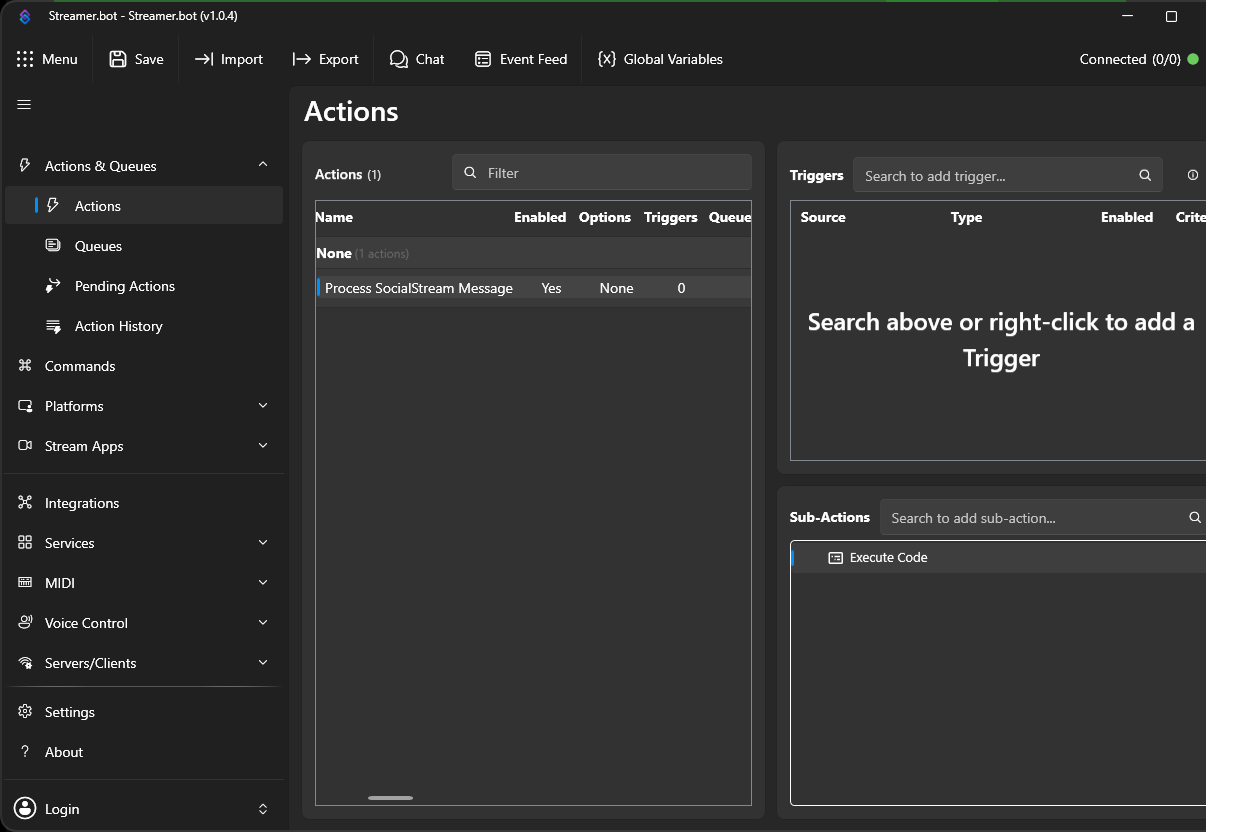
When set up correctly, the Actions page should look like this, with Execute Code listed under Sub-Actions:
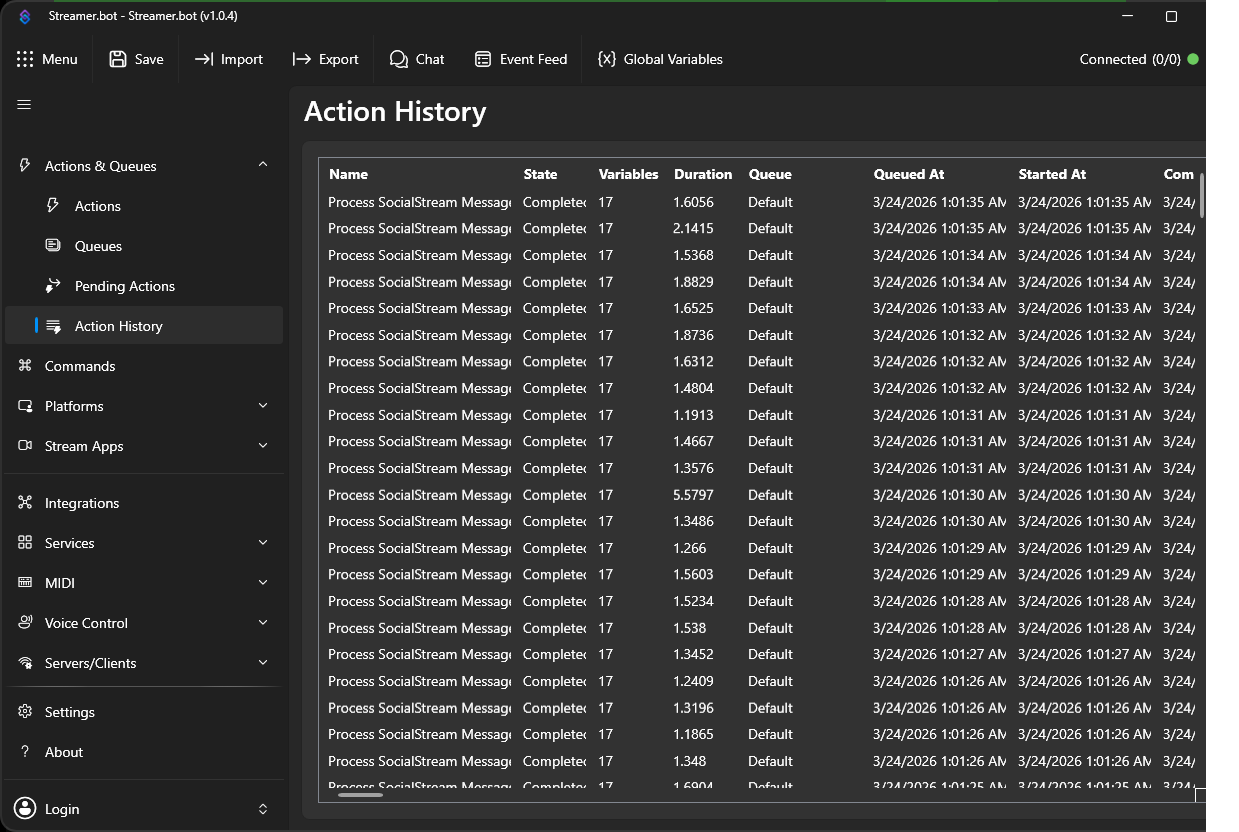
The Action History will show each incoming message as a completed action with all its variables:
Configuring SocialStream.Ninja
- In SocialStream.Ninja's menu, go to Global settings and tools → Mechanics (or similar path).
- Find the Streamer.bot integration section.
- Toggle the integration **ON**.
- Set the **WebSocket URL** to match Streamer.bot (e.g., `ws://127.0.0.1:8080`). Use `127.0.0.1` if SSN is on the same PC as Streamer.bot.
- If you set a password in Streamer.bot's WebSocket Server settings, enter it in the **Password** field here.
- **Action ID (Required):** Paste the Action ID you copied from Streamer.bot into this field. This is required for the integration to function.
- Save your settings in SocialStream.Ninja.
SocialStream.Ninja Data Structure Reference
When SocialStream.Ninja sends data to Streamer.bot, it passes the following fields as action arguments. They are immediately accessible as %fieldname% in any sub-action — no C# required. The C# code above additionally renames them to the ss_* prefix.
Primary Data Fields
These fields are always present:
| Field Name |
Type |
Description |
Argument Name |
Example Usage |
| chatmessage |
String |
The actual chat message content. May contain HTML tags if textonly is false. |
ss_message |
%ss_message% |
| chatname |
String |
The display name of the user who sent the message. |
ss_username |
%ss_username% |
| userid |
String |
The unique ID of the user from the original platform. |
ss_userId |
%ss_userId% |
| chatimg |
String |
URL to the user's avatar/profile image. |
ss_avatar |
%ss_avatar% |
| bot |
Boolean |
True if the message is from a known bot. |
ss_bot |
%ss_bot% |
| mod |
Boolean |
True if the sender is a moderator. |
ss_mod |
%ss_mod% |
| host |
Boolean |
True if the sender is the channel host/broadcaster. |
ss_host |
%ss_host% |
| admin |
Boolean |
True if the sender has admin/channel owner status. |
ss_admin |
%ss_admin% |
| vip |
Boolean |
True if the sender has VIP status on the channel. |
ss_vip |
%ss_vip% |
| originalPlatform |
String |
The platform the message originated from (e.g., "youtube", "twitch", "kick", etc.). |
ss_platform |
%ss_platform% |
| source |
String |
Identifies the source as "SocialStream.Ninja". |
ss_source |
%ss_source% |
Additional Available Fields
These additional fields may be present depending on the message type and platform:
| Field Name |
Type |
Description |
Direct use |
In C# |
| contentimg |
String |
URL to content image, if present in the message. |
%contentimg% |
CPH.TryGetArg<string>("contentimg", out string contentImg) |
| subtitle |
String |
Additional text like user status or other metadata. |
%subtitle% |
CPH.TryGetArg<string>("subtitle", out string subtitle) |
| membership |
String |
Membership/subscriber tier name, if applicable. |
%membership% |
CPH.TryGetArg<string>("membership", out string membership) |
| hasDonation |
String |
Donation amount string if this is a Super Chat or donation event. |
%hasDonation% |
CPH.TryGetArg<string>("hasDonation", out string hasDonation) |
| type |
String |
Message type (e.g., "chatmessage", "superchat"). |
%type% |
CPH.TryGetArg<string>("type", out string type) |
| id |
String |
Unique message ID from the source platform. |
%id% |
CPH.TryGetArg<string>("id", out string id) |
| nameColor |
String |
HEX color code for the username (e.g., "#FF0000"). |
%nameColor% |
CPH.TryGetArg<string>("nameColor", out string nameColor) |
| chatbadges |
String |
Chat badges from the source platform. |
%chatbadges% |
CPH.TryGetArg<string>("chatbadges", out string chatbadges) |
| textonly |
Boolean |
If true, HTML has been stripped from the message. |
%textonly% |
CPH.TryGetArg<bool>("textonly", out bool textOnly) |
| tid |
String |
Transaction ID used for duplicate detection. |
%tid% |
CPH.TryGetArg<string>("tid", out string tid) |
Accessing Additional Fields in C#
To access fields not already extracted in the example C# code, add lines like these inside your Execute() method:
// Extract additional fields as needed
CPH.TryGetArg<string>("contentimg", out string contentImage);
CPH.TryGetArg<string>("subtitle", out string subtitle);
CPH.TryGetArg<string>("nameColor", out string nameColor);
CPH.TryGetArg<string>("hasDonation", out string donation);
CPH.TryGetArg<string>("membership", out string membership);
CPH.TryGetArg<bool>("textonly", out bool textOnly);

nameColor = nameColor ?? "#FFFFFF";

// Make them available as arguments for subsequent sub-actions
CPH.SetArgument("ss_contentImage", contentImage ?? "");
CPH.SetArgument("ss_subtitle", subtitle ?? "");
CPH.SetArgument("ss_nameColor", nameColor);
CPH.SetArgument("ss_donation", donation ?? "");
CPH.SetArgument("ss_membership", membership ?? "");
CPH.SetArgument("ss_textOnly", textOnly);
Going Further
Once the basic action is set up, here are common things to add.
Using args directly (no C# needed)
For simple actions you don't need C# at all. All incoming fields are available as %fieldname% in any sub-action that supports variables. For example, to echo all chat to your Twitch channel:
- Right-click action → Add Sub-Action → Twitch → Chat → Send Message
- Set message to:
[%originalPlatform%] %chatname%: %chatmessage%
That's it — no C# required.
Filtering out bots
Add an If/Else sub-action before any others to drop bot messages early:
- Right-click action → Add Sub-Action → Core → Logic → If/Else
- Set condition: Argument
bot Equals True
- In the Then branch, add: Core → Actions → Exit Action (or just leave it empty to do nothing)
Similarly, mod, host, admin, and vip are also available as boolean arguments for any special handling you want for moderators, the broadcaster, admins, or VIPs.
Routing by platform
Use If/Else to do different things per platform. For example, play a different sound for YouTube vs Twitch:
- Right-click action → Add Sub-Action → Core → Logic → If/Else
- Condition: Argument
originalPlatform Equals youtube
- Then branch: add your YouTube sub-actions (e.g., play a sound)
- Else branch: add your Twitch/other sub-actions
You can nest If/Else blocks or use C# for more complex multi-platform logic.
Handling donations / Super Chats
The hasDonation field is non-empty when the message is a Super Chat or donation event. To trigger a special alert:
- Add an If/Else: Argument
hasDonation Is Not Empty
- Then branch: trigger your donation alert action, e.g. Core → Actions → Run Action → "Donation Alert"
Platform-specific logic in C#
You can extend the C# sub-action with conditional processing. Add this inside your Execute() method after the initial arg extraction:
// Filter bots early
if (bot) return false;

// Platform-specific extras
if (originalPlatform.Equals("youtube", StringComparison.OrdinalIgnoreCase))
{
    CPH.TryGetArg<string>("membership", out string membership);
    if (!string.IsNullOrEmpty(membership))
    {
        CPH.SetArgument("ss_membership", membership);
        CPH.LogInfo(string.Format("[YouTube Member] {0}: {1}", username, membership));
    }
}
else if (originalPlatform.Equals("twitch", StringComparison.OrdinalIgnoreCase))
{
    CPH.TryGetArg<string>("chatbadges", out string badges);
    bool isSub = !string.IsNullOrEmpty(badges) && badges.Contains("subscriber");
    CPH.SetArgument("ss_isSubscriber", isSub);
}

// Donations / Super Chats
CPH.TryGetArg<string>("hasDonation", out string donation);
if (!string.IsNullOrEmpty(donation))
{
    CPH.SetArgument("ss_donation", donation);
    CPH.RunAction("Donation Alert", false); // trigger a separate action
}
Updating an OBS text source
To show the latest message in an OBS text source:
- Add Sub-Action → OBS Studio → Raw → Send Raw OBS Request (or use the dedicated Set Source Text sub-action if available)
- Alternatively, write the message to a text file: Add Sub-Action → Core → File IO → Write to File, with content
[%originalPlatform%] %chatname%: %chatmessage%, and point OBS at that file via a text source with "Read from file" enabled.
Troubleshooting
-
Cannot connect to WebSocket:
- Verify the WebSocket Server is Enabled and Running (Status: Listening) in Streamer.bot.
- In v1.0+, check Settings → Servers → WebSocket Server. In older versions, check Servers/Clients → WebSocket Server.
- Ensure the Port in SocialStream.Ninja matches the Port in Streamer.bot (default: 8080).
- Check firewall rules on your PC aren't blocking the connection (especially if not using
127.0.0.1).
- Verify the Password matches exactly if authentication is enabled in Streamer.bot (or that it's blank in both if disabled).
- Check the SocialStream.Ninja console logs (usually F12 in the app/browser) for connection errors.
-
Messages not triggering Action in Streamer.bot:
- Verify the Action ID in SocialStream.Ninja settings exactly matches the ID copied from Streamer.bot (right-click action → Copy Action ID).
- Check the Streamer.bot Action Queues tab to see if the action is being triggered but failing. Look for errors in the logs.
- Ensure the C# code in your action compiles successfully (click Compile in the C# sub-action editor).
- Add a simple
Core → Misc → Log Message sub-action as the first sub-action to confirm the action is being triggered at all.
- Check the SocialStream.Ninja console logs for errors when sending the DoAction request.
-
C# Code won't compile:
- Use
CPH.TryGetArg<string>("key", out string value) — not CPH.GetArg(), which does not exist in Streamer.bot v1.0+.
- Check for typos in method names:
CPH.TryGetArg, CPH.SetArgument, CPH.LogInfo.
- Make sure all braces
{} are properly matched.
- Do not add
using Newtonsoft.Json.Linq; — the code above does not require it.
-
Arguments not working in Sub-Actions:
- Ensure the C# sub-action runs before the sub-actions that use the arguments.
- Double-check argument names:
CPH.SetArgument("ss_message", ...) becomes %ss_message% in sub-actions.
- Arguments are case-sensitive - ensure exact match between what you set and what you use.
Useful Resources
Important Note on Direct Chat Display
Limitation: Sending messages from an external application (like SocialStream.Ninja) via WebSocket to directly appear within Streamer.bot's own "Chat" tab or integrated overlays (using the `ChatMessage` request type) is currently **not a reliably supported feature** of the Streamer.bot WebSocket server.
While the WebSocket specification includes a `ChatMessage` request, its behaviour for *injecting* messages *into* Streamer.bot's display seems inconsistent or non-functional for this purpose. Its primary role is typically to report messages *from* Streamer.bot *to* connected clients.
Therefore, **you MUST use the Action ID method** described above to send message data to Streamer.bot. You can then use sub-actions within Streamer.bot (like sending a message to your Twitch/YouTube channel) if you want the message content to appear in chat overlays that monitor those platforms.
Please do not report issues related to messages not appearing directly in Streamer.bot's chat tab when *not* using an Action ID, as this relies on functionality that may need to be specifically added or modified by the Streamer.bot developers.
For help on using Streamer.bot, please contact the Streamer.bot's support, as I do have on experience with using it. Also, Streamer.bot's code does not appear to be open-sourced, so if you wish to have additional Social Stream Ninja supported within Streamer.bot, you'll need to make requests to them.
-steve