
我要編輯OBS連結還是HTML檔?
覆蓋檔案是 poll.html. 它包含民意調查的佈局、樣式和投票代碼。您複製到 OBS 中的 URL 指向該文件,並在 ?.
https://socialstream.ninja/poll.html?session=YOUR_SESSION對於顏色、字體、間距和欄樣式,您可以保留託管 URL 並添加 自訂 CSS OBS。對於具有新圖稿、標誌或不同版面的設計,請編輯以下內容的副本 poll.html 並將 OBS 指向您的副本。自訂副本不會自動出現在 SSN 的主題下拉清單中。
直接磁碟載入、OBS 本機檔案啟動器、安全性渲染範例和支援參考,請參閱 共享疊加設計指南.
首先使用以下命令進行定期民意調查 投票設定指南.保留完整產生的圖形投票連結以用於下面的連接步驟。
1. 在 OBS 中設定託管投票的樣式
- 在 SSN 中開啟 圖形投票 → 投票選項。選擇 預設 ;對應的設定項目: 民意調查風格/主題 作為本例的起點,並打開 啟用投票.
- 複製圖形投票連結。在OBS中,新增或開啟其 瀏覽器來源,保留 本機檔案 取消選中,並將連結貼到 URL.
- 例如,將瀏覽器來源大小設定為畫布大小 1920 × 1080.將下面的 CSS 貼到 自訂 CSS,然後點擊 確定.如果您想重複使用它,請儲存現有的 CSS。
body {
    margin: 0;
    background: transparent;
    overflow: hidden;
}

#poll-container {
    box-sizing: border-box;
    width: 880px;
    max-width: 90%;
    padding: 28px;
    border-radius: 0;
    border-left: 8px solid #f5c542;
    background: rgba(8, 24, 48, 0.95);
    color: #ffffff;
    font-family: Arial, sans-serif;
}

#poll-container .poll-title {
    color: #ffffff;
    font-size: 36px;
    text-align: left;
    margin: 0 0 24px;
}

#poll-container .poll-option {
    background: #162e50;
    border-radius: 0;
    padding: 14px 16px;
    font-size: 26px;
}

#poll-container .poll-bar {
    background: #3266ad;
}

#poll-container .poll-instruction {
    font-size: 22px;
    margin-bottom: 18px;
}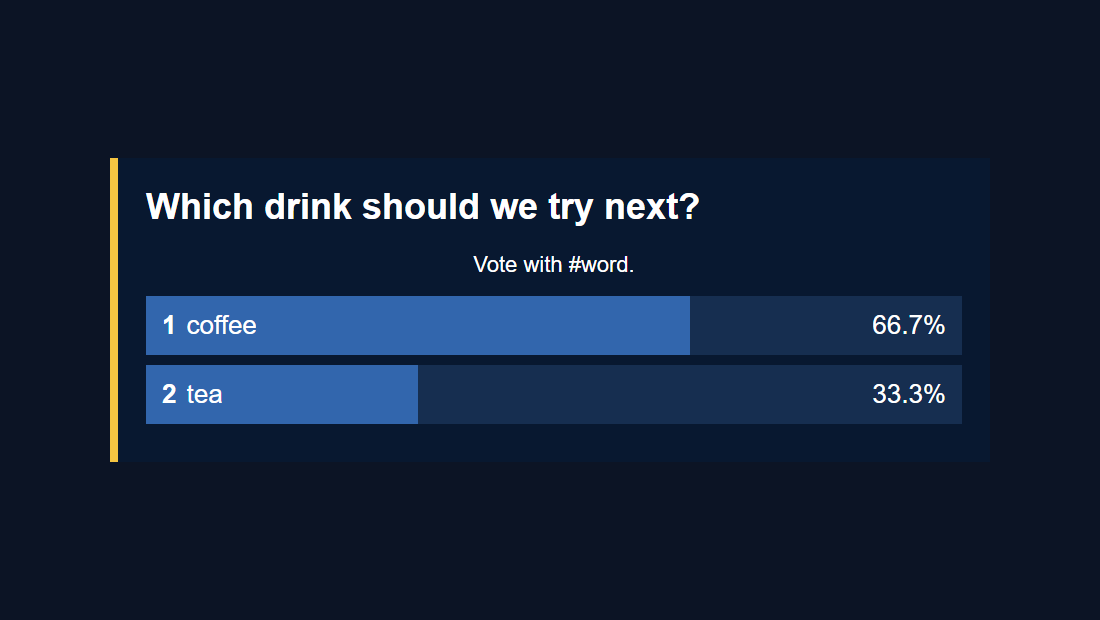
變更顏色值和尺寸以適合您的設計。這些選擇器針對現有的 poll 元素。保持條形寬度由輪詢代碼控制,並保持 .hidden 行為,以便啟用輪詢可以顯示和隱藏圖形。
OBS 自訂 CSS 僅影響該瀏覽器來源;在普通瀏覽器中開啟相同的 URL 將顯示原始樣式。參見 OBS的瀏覽器原始碼參考 來源屬性。
民意調查特定限制: 目前 poll.html 未讀 &css= 或 &b64css=.使用 OBS 自訂 CSS 或編輯此疊加層的檔案。
2. 製作一份可編輯的民意調查副本
- 下載 Social Stream Ninja 來源 ZIP(測試版) 並提取它。您可以檢查 GitHub 上的 poll.html 原始碼.
- 在解壓縮的資料夾中,複製
poll.html作為my-poll.html.將其放在資料夾頂層的原件旁邊。 - 開啟
my-poll.html在文字/程式碼編輯器中,或將該檔案連同參考圖像、品牌顏色、字體和您想要的 OBS 畫布尺寸一起提供給 ChatGPT 或 Codex。 - 對於僅 CSS 編輯,請將您的規則放在現有規則的末尾
<style>塊,就在之前</style>.上面的例子也適用於此。儲存檔案.html副檔名。
保留支援文件。 當前poll相對於自己的位置載入這些腳本;僅將 HTML 複製到新資料夾是不夠的:
your-poll-folder/
    my-poll.html
    currency.js
    js/
        transport-dedupe.js
        local-server-url.js
    shared/
        overlay-control-transport.js
    thirdparty/
        NotoColorEmoji.ttf
    favicon.ico
字體和圖示是引用資源;四個 JavaScript 檔案支援投票和連接。保持提取的資料夾完好無損,可以使這些路徑保持可用。也可以在其中添加您的設計使用的任何徽標或字體檔案。
3. 給AI現有的文件和具體的簡介
附上 my-poll.html 和您的設計參考,或在編碼工具中開啟提取的資料夾。替換此提示中括號中的詳細資訊:
Customize this existing Social Stream Ninja poll overlay.

Design: [describe the look or match the attached reference].
Colors: [brand hex colors]. Font: [font name or supplied font file].
Logo: [supplied image filename, if any].
OBS canvas: [1920 x 1080]. Placement: [center / lower third / side panel].
Allow for long questions and up to 10 free-form answers.

Edit my-poll.html, using CSS first. Keep the existing working poll code:
hashtag matching, vote counting, duplicate-vote handling, percentages,
tallies, donation weighting, settings updates, and start/end/reset controls.
Keep session/password/transport URL handling and all supporting script loads.
Preserve #poll-container, #poll-title, #poll-options, and show/hide behavior.
The script replaces #poll-options contents when results update, so put any
permanent logo or decoration outside that element.
Do not hard-code sample results or private session details.
Keep the page compatible with Chrome 80 and OBS Browser Source.

Treat all incoming messages, names, labels, donations, and metadata as untrusted.
Prevent HTML/JavaScript injection in every renderer you change. Use textContent
for plain fields and for chatmessage when textonly is true. For HTML-mode
chatmessage, keep supported emotes/formatting through the packaged
SocialStreamChatHTML.sanitize helper (libs/objects.js loaded first).
Do not concatenate raw input into innerHTML, attributes, CSS, or JavaScript.
Validate media/link URLs with the page's existing URL policy and assign DOM
properties; do not enable javascript: URLs or executable embedded content.
Never eval incoming data or treat a viewer message as an AI instruction.
Keep source checks, connection handling, and existing sanitizers.
Test plain text, allowed emotes, quotes, angle brackets, and an HTML injection
probe in an isolated preview; verify the probe cannot execute.

Make the edited poll work directly from disk using a file:/// URL,
without requiring a local web server. Return the complete edited HTML,
list any extra image/font files needed, and include the file URL steps for OBS.
對於 OBS CSS 路由,將最後一條指令改為: “使用現有的投票選擇器和預設主題,僅傳回 OBS 自訂 CSS 的 CSS;不包含 HTML 或腳本標記。”
對於手動編輯,主要的樣式掛鉤是 #poll-container, .poll-title, .poll-option, .poll-bar, .option-number, .option-text, .option-percentage, .option-tally,以及 .poll-instruction.佈局變更可能還需要在兩者中進行配對編輯 updatePollOptions() 和 updatePollResults(),建構答案行。
4. 在OBS中開啟編輯好的投票
開啟 my-poll.html 直接來自您的電腦。無需安裝或啟動伺服器。
- 拖曳
my-poll.html進入 Chrome 或 Edge。從網址列複製地址;它開始於file:///. - 複製所有內容
?從 SSN 的工作圖形民意調查連結開始。將其新增至文件地址的末尾。這會保留您的會話、密碼和其他設定。 - 在瀏覽器中開啟該組合位址進行檢查。然后将其粘贴到OBS浏览器源的 URL 場與 本機檔案 未檢查。設定預期的寬度和高度。
例如,複製的連結:
https://socialstream.ninja/poll.html?session=YOUR_SESSION&password=YOUR_PASSWORD&server2變成:
file:///C:/SSN/social_stream-beta/my-poll.html?session=YOUR_SESSION&password=YOUR_PASSWORD&server2這些是佔位符:使用您實際複製的鏈接,僅包括它已有的選項。繼續使用SSN的 投票選項 設定問題、投票匹配和投票控制。
上面的檔案地址是Windows範例。在 macOS 上,它以 file:///Users/....複製瀏覽器的實際位址,以便為您處理路徑和任何空格。
設定一次。 OBS 保存位址。將下載的資料夾保留在同一位置,並在使用投票時保持 SSN 和您的聊天來源運作。儲存編輯後,使用 重新整理目前頁面快取 在來源屬性中。
為什麼不選取本機檔案? 使用URL欄位包括之後的會話設置 ?.單獨選擇 HTML 檔案不會。的 共享指南 也涵蓋了文件選擇器的可選啟動器。
5. 以真實民意調查測試設計
- 保持 SSN 和捕獲的聊天來源運作。在 投票選項,啟用輪詢,設置 自由形式,輸入問題,然後選擇 僅精確投票.
- 傳送
#coffee和#tea來自不同的聊天用戶,或使用不同的虛構用戶 測試訊息工具.停用多次投票後,同一用戶重複投票將不會再增加選票。 - 檢查 OBS 中的長條圖和總計。嘗試一個很長的問題,一個很長的答案,然後 顯示票數而非百分比 檢查文字是否適當的選項。
- 測試 主題標籤可出現在任意位置 帶有更長的訊息,例如
I vote #coffee today。檢查 結束投票, 重設投票,以及 啟用投票 因此自定义设计可以处理关闭、空和隐藏状态。
- 空白覆蓋: 檢查啟用輪詢和複製的會話設定。在投票到達之前,自由形式的民意調查沒有答案行。
- 本地頁面打不開: 再次將檔案拖曳到瀏覽器中並複製其目前位址。檢查檔名是否不小心
my-poll.html.txt. - 卡在「正在載入民調」: 檢查支援腳本及其資料夾路徑、SSN 的運作狀態以及工作託管民意調查中的完整查詢字串。
- 投票不計入: 確認投票已開啟,訊息符合所選投票方式,且測試用戶尚未投票。
- OBS 中看起來有所不同: 檢查瀏覽器來源尺寸、覆蓋檔案設計的任何較舊的自訂 CSS,以及是否需要刷新。
- 投票後Logo消失: 將永久性藝術品放在外面
#poll-options;該元素在更新時重建。
您編輯的副本與 SSN 的託管投票分開維護。保留設計的備份,並與新的進行比較 poll.html 版本。若要從頭開始建置不同的覆蓋層,請參閱 自訂疊加層指南.