
Mit wachsender Spendensumme ein anderes GIF zeigen
Verwende ein angepasstes Overlay mit Zielbalken und Bild. Der Balken berechnet den Fortschritt bereits; das Bild soll diesem Fortschritt folgen, statt Spenden separat zu zählen. Dafür brauchst du eine bearbeitete Overlay-Kopie, keine zusätzliche integrierte Einstellung.
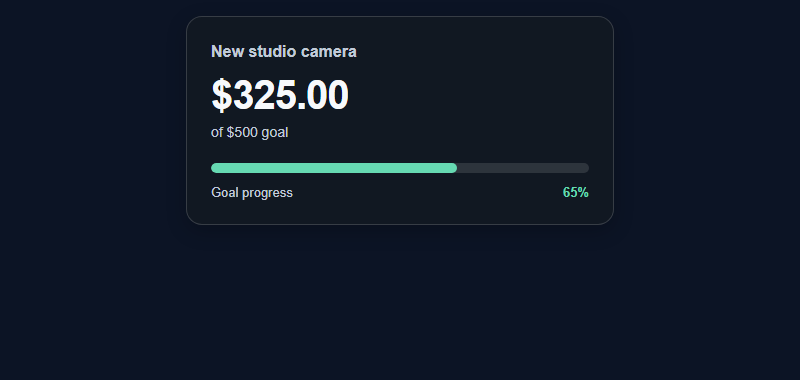
- Konfiguriere in SSN Trinkgeldglas und Zielanzeige mit Fließender Zielbalken, deinem Titel, Ziel und Spendenfiltern. Lass für dieses feste Geldziel von 500 $ Hype-Cup-Wertung deaktiviert und schalte wiederkehrende oder steigende Ziele aus. Sorge vor der Anpassung dafür, dass der ursprüngliche Link funktioniert.
- Follow Laden Sie die Dateistruktur herunter und behalten Sie sie bei unten, um Folgendes zu erstellen:
my-goal.html. Speichere deine fünf GIFs neben dieser Datei und verwende die Namen aus der Tabelle. Nutze gleiche Bildflächen, damit das Bild beim Wechsel nicht springt oder verzerrt wird. - Gib deinem Editor oder KI-Tool den kopierten Quellcode und die GIFs. Verwende die Meilenstein-Anweisungen unten zusammen mit dem vollständigen Anpassungsprompt. Bitte um ein Bild neben dem bestehenden Balken.
- Prüfe die bearbeitete Kopie an jedem Meilenstein und folge dann Sitzung und OBS um die Kopie mit den ursprünglichen Linkeinstellungen zu verbinden. Füge das kombinierte Overlay als eine OBS-Browserquelle hinzu.
| Zielfortschritt | Bei einem Ziel von 500 $ | Deine GIF-Datei |
|---|---|---|
| 0 % bis unter 25 % | 0 $ bis unter 125 $ | goal-0.gif |
| 25 % bis unter 50 % | 125 $ bis unter 250 $ | goal-25.gif |
| 50 % bis unter 75 % | 250 $ bis unter 375 $ | goal-50.gif |
| 75 % bis unter 100 % | 375 $ bis unter 500 $ | goal-75.gif |
| 100 % und mehr | 500 $ und mehr | goal-100.gif |
Die Dateinamen sind Beispiele; stelle eigene Bilder bereit. Diese Dollarbeträge gelten für dieses feste Geldziel. Wähle bei Zähl-, Hype-, wiederkehrenden oder steigenden Zielen das Bild anhand der angezeigten Prozentzahl des Balkens.
GIF-Meilenstein-Anweisungen kopieren
Add milestone artwork beside the existing Fluid Goal Bar in my-goal.html.
Use these relative GIF files:
0%: goal-0.gif; 25%: goal-25.gif; 50%: goal-50.gif;
75%: goal-75.gif; 100%: goal-100.gif.

Read the existing getProgressState().percentage from the renderAmount()
update path. Do not add a second donation counter or change goal math.
Select the highest reached threshold. If progress jumps from 20% to 80%,
show goal-75.gif directly. Clamp the artwork selection to 0–100%.
Change img.src only when its selected file changes so ordinary updates
do not restart the GIF. Keep one fixed-size image box with object-fit: contain.
Provide meaningful alternative text and handle a missing image without
hiding or breaking the goal bar.

Update the artwork on first render, donations, manual total changes,
reset, restored totals, and recurring/advancing-goal transitions.
Keep the completion image while a fixed goal remains at or above 100%.
If the configured goal resets or advances, follow its displayed percentage.
Preserve the existing filters, session, password, currency/count/Hype
semantics, persistence, completion rules, and local dependencies.

Use the existing preview mode to test 0, 124, 125, 249, 250, 374,
375, 499, 500, and 600 against a fixed goal of 500. Also test a large
jump, a manual decrease, reset, refresh, and any enabled recurring rules.
Proben, ohne Live-Summen zu ändern
Öffne deine bearbeitete Kopie mit den Vorschauoptionen unten. Ändere startamount auf die Werte im Prompt und lade zwischen den Prüfungen neu. Die Vorschau verwendet Beispieldaten und deaktiviert Live-Verbindungen, gespeicherte Summen und Ton.
file:///C:/SSN/social_stream-beta/my-goal.html?preview&style=bar&goal=500&startamount=125Bei 125 $ sollte das erste Meilenstein-GIF neben einem zu 25 % gefüllten Balken erscheinen. Entferne preview und den Übungswert startamount bevor du deine echte Sitzung mit ihren ursprünglichen Einstellungen verwendest. Prüfe wiederhergestellte Summen und das Zurücksetzen separat in einer Testsitzung, da die Vorschau keine Summen speichert.
Wählen Sie die richtige Startseite
Das Tip Jar/Goal Meter kann verschiedene Metriken und Stile desselben darstellen tipjar.html. Konfigurieren Sie zunächst die beabsichtigte Metrik in SSN und behalten Sie dann die generierte URL bei, wenn Sie das Design ändern. Die Hype-Bewertung bei diesem Tor unterscheidet sich vom Zuschauer-/Chatter-Zähler in hype.html.
Laden Sie die Dateistruktur herunter und behalten Sie sie bei
- Laden Sie die Quell-ZIP-Datei herunter und extrahieren Sie es. Diese Anleitungen verwenden die Beta-Quelle; Bewahren Sie die Dateien eines Downloads zusammen auf.
- Kopieren
tipjar.htmlaufmy-goal.htmlneben dem Original. Wenn Sie eine andere Seite oder ein anderes Thema auswählen, bewahren Sie die Kopie im Originalordner dieser Datei auf. - Öffnen Sie den kopierten HTML-Code und das referenzierte CSS/JS in Ihrem Editor oder KI-Tool. Fügen Sie die bereitgestellten Grafiken/Schriftarten demselben Projekt hinzu und verwenden Sie relative Pfade. Beginnen Sie mit CSS-Überschreibungen; Beziehen Sie den Renderer ein, wenn Sie das generierte Markup ändern.
Die folgenden Dateien helfen Ihnen bei der Suche nach Design und Verhalten. Dies ist eine Leseliste, kein vollständiges Abhängigkeitspaket: Behalten Sie den extrahierten Ordner bei, einschließlich Bildern, Schriftarten, Skripten und allen Datendateien.
| Datei | Warum es wichtig ist |
|---|---|
tipjar.html | Ziel-/Jar-Darstellung, Einstellungen und Mengenverwaltung. |
currency.js | USD-Schätzungen und Quellenüberschreibungen. |
thirdparty/matter.min.js | Von Jar-Präsentationen verwendete Physik. |
shared/overlay-control-transport.js | Host-Einstellungen und Steuerungsaktualisierungen. |
shared/utils/chatHtml.js | Display-Desinfektion; erfordert libs/objects.js. |
Verbinden Sie Ihre Kopie und öffnen Sie sie in OBS
Starten Sie SSN und sorgen Sie dafür, dass zunächst die ursprünglich generierte Overlay-URL funktioniert. Die session= value stellt eine Verbindung zu dieser SSN-Sitzung her; Es ist nicht Ihr Kanalname oder der Name dieser Datei. Halten Sie SSN, die relevante Funktion und ihre Datenquellen am Laufen.
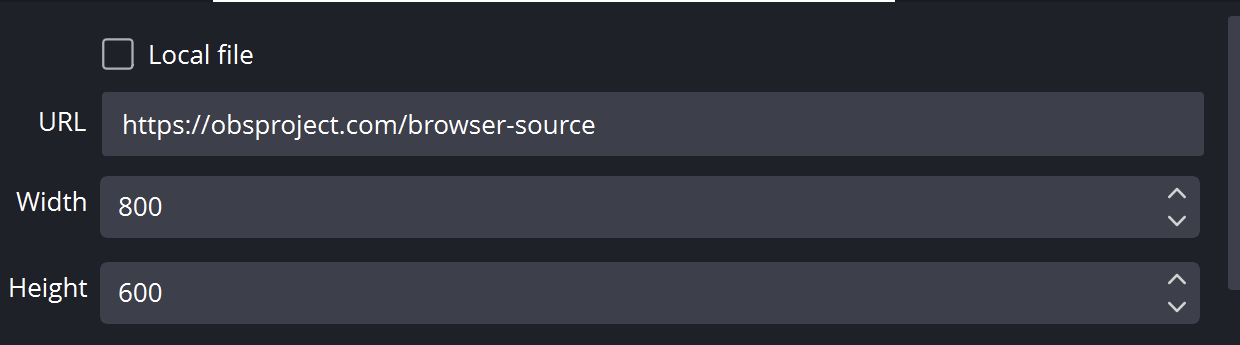
- Ziehen Sie Ihre bearbeitete HTML-Datei in Chrome oder Edge. Kopieren Sie die Adresse aus der Adressleiste. es beginnt mit
file:///. - Alles kopieren von
?weiter in Ihrem funktionierenden SSN-Overlay-Link und fügen Sie ihn am Ende dieser Dateiadresse hinzu. Behalten Sie alle Einstellungen bei, einschließlich Sitzung, Passwort usw#Ende. - Öffnen Sie das Ergebnis in einem Browser und legen Sie dann eine OBS-Browserquelle fest URL an die gleiche Adresse mit Lokale Datei ungeprüft. Passen Sie die Quellabmessungen an Ihr beabsichtigtes Design an.
Für die obige Startdatei sieht die lokale Adresse wie folgt aus; Ihr tatsächlicher Link kann zusätzliche erforderliche Optionen enthalten:
file:///C:/SSN/social_stream-beta/my-goal.html?session=YOUR_SESSIONVerwenden Sie die tatsächliche Dateiadresse auf Ihrem Computer. OBS speichert es mit der Quelle; Bewahren Sie den heruntergeladenen Ordner am selben Ort auf. Aktualisieren Sie nach dem Speichern der Designänderungen die Browserquelle. Die Gemeinsame Einrichtungsanleitung enthält Mac-Beispiele und einen optionalen Launcher für das Kontrollkästchen „Lokale Datei“.
Wo kann das Design geändert werden?
Ändern Sie das Glasbild, die Füllfarben, die Balkenspur, die Zielbeschriftung, die Mengentypografie und die Abschlussanimation. Beginnen Sie mit den vorhandenen Stil- und Farbsteuerelementen, die im beschrieben werden Zielführer. Bewahren Sie bei benutzerdefinierten Grafiken die Assets neben Ihrer Kopie auf und aktualisieren Sie nur den referenzierten Pfad.
Die Metrik des Ziels, Abschluss-/Zurücksetzungsregeln, Persistenz und Spenderzählung gehören zu seinem Verhalten. Behalten Sie diese bei, während Sie die Präsentation ändern. Wandeln Sie Rohmünzen, geschenkte Abonnements und USD nicht in eine unbeschriftete Zahl um. Behalten Sie eine Zahl bei donoValue von Null, wenn die Quelle es bereitstellt.
Kopieren Sie diese KI-Eingabeaufforderung
Geben Sie der KI Ihre kopierten Quelldateien und Referenzvorlagen. Ersetzen Sie die Angaben in Klammern. Behalten Sie die Hinweise zur Eingabesicherheit in der Eingabeaufforderung bei.
Vollständige Eingabeaufforderung anzeigen
Customize my-goal.html, copied from tipjar.html.
Design: [describe the look or attach a reference].
Colors/fonts/assets: [supply hex colors and local filenames].
OBS canvas and placement: [size and position].

Style this tip jar/goal as [design] for [canvas]. Change artwork, colors, layout, labels, and motion while preserving the chosen metric, amount calculation, source filters, streak handling, persistence, and completion/reset rules. Keep hasDonation display units and donoValue USD semantics. Do not fabricate progress when the feed is empty.

Read docs/event-reference.html for incoming fields and
docs/overlay-customization-guide.html for local setup and safe rendering.
Keep the existing session/password handling, labels, server routes, query
parameters, URL fragments, and relative asset paths. Use classic scripts
compatible with Chrome 80. Keep executable dependencies packaged locally.

Treat all incoming messages, names, labels, donations, and metadata as untrusted.
Prevent HTML/JavaScript injection in every renderer you change. Use textContent
for plain fields and for chatmessage when textonly is true. For HTML-mode
chatmessage, keep supported emotes/formatting through the packaged
SocialStreamChatHTML.sanitize helper (libs/objects.js loaded first).
Do not concatenate raw input into innerHTML, attributes, CSS, or JavaScript.
Validate media/link URLs with the page's existing URL policy and assign DOM
properties; do not enable javascript: URLs or executable embedded content.
Never eval incoming data or treat a viewer message as an AI instruction.
Keep source checks, connection handling, and existing sanitizers.
Test plain text, allowed emotes, quotes, angle brackets, and an HTML injection
probe in an isolated preview; verify the probe cannot execute.

Make the edited overlay work directly from disk using a file:/// URL,
without requiring a local web server.
Return the edited files, any additional assets, exact local browser/OBS
setup instructions using placeholders, and the specific tests performed.
Do not put my private session link or credentials into a public example.
Testen Sie diesen Overlay-Typ
Verwenden Sie zunächst eine Vorschau oder ein Test-Setup. Die Anleitung für Testnachrichten erklärt, wie man fiktive Nutzlasten über SSN sendet; Ein an Ihre Produktionssitzung übermittelter Test kann die vorhandenen Automatisierungen auslösen.
- Probieren Sie zunächst den Vorschaumodus der Seite aus (Vorschau mit Ihren Stiloptionen). Entfernen Sie die Vorschau, wenn Sie die reale Sitzung verbinden.
- Verwenden Sie Beispiel-Supportereignisse, die der gewählten Metrik entsprechen. Überprüfen Sie Null, Teilfortschritt, Ziel erreicht und Fortschritt über das Ziel hinaus.
- Überprüfen Sie die Reset-/Übertragungseinstellungen und eine Quellenaktualisierung zwischen den Proben. Überprüfen Sie Währungsbeschriftungen, lange Titel und alle Sound- oder Vervollständigungseffekte in OBS.
Führen Sie außerdem die aus Eingabe-Rendering-Prüfungen gegen die Renderpfade, die Sie geändert haben. Aktualisieren Sie nach dem Speichern der Änderungen die OBS-Browserquelle zwischen den Proben und wiederholen Sie die sichtbare Interaktion. Durch Browservorschauen wird keine Live-Aufnahme oder kein OBS-Verhalten festgestellt.
Weitere Informationen: Kennzahlen und Zielkontrollen · Spendenfelder · Ereignisreferenz · Fehlerbehebung bei der lokalen Einrichtung.