 Social Stream NinjaSocial Stream Ninja
استخدم خطوطك الخاصة مع dock.html وfeatured.html، سواء حمّلتهما في مصدر متصفح OBS أو إضافة Chrome أو تطبيق سطح المكتب.
dock.html أو featured.html باستخدام معاملات URL أو CSS المخصص في OBS.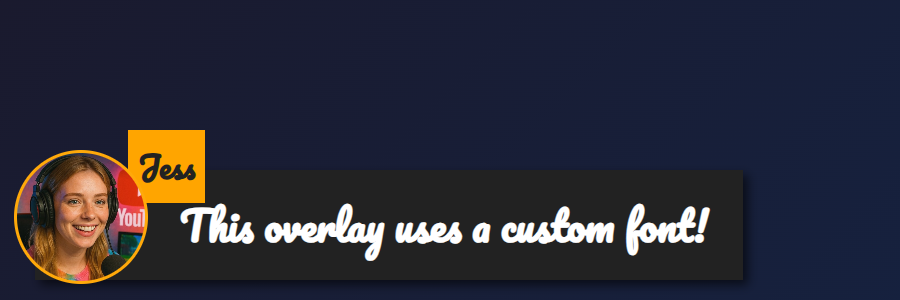
featured.html مع &googlefont=Pacifico مطبّقاً — تعمل الخطوط المستضافة ذاتياً بالطريقة نفسها عبر @font-face.تحتاج إلى رابط HTTPS مباشر لملف الخط. اختر استضافة تسمح بالربط المباشر وCORS كي يستطيع المتصفح داخل OBS أو التطبيق جلبه.
عرّف الخط باستخدام @font-face ووجّهه إلى ملفك المستضاف، ثم اضبط التراكب لاستخدامه عبر --font-family.
@font-face {
  font-family: 'MyDockFont';
  src: url('https://your-site.example/fonts/MyDockFont.woff2') format('woff2');
  font-style: normal;
  font-weight: 400;
}

/* Optional second weight */
@font-face {
  font-family: 'MyDockFont';
  src: url('https://your-site.example/fonts/MyDockFont-Bold.woff2') format('woff2');
  font-style: normal;
  font-weight: 700;
}

:root {
  --font-family: 'MyDockFont', 'Segoe UI', 'Arial Unicode MS', sans-serif;
  --comment-font-size: 28px;
  --author-font-size: 24px;
  --message-line-height: 32px;
}
تحتاج إلى عدة خطوط (للأرمنية والروسية واللاتينية)؟ عرّف كل font-face وأدرجها في --font-family مثل 'FontA', 'FontB', 'FontC', sans-serif. سيستخدم المتصفح الخط البديل تلقائياً عند غياب رمز.
&css=https://your-site.example/my-font.css إلى رابط الصفحة:
https://socialstream.ninja/dock.html?session=YOURSESSION&css=https://your-site.example/my-font.css
https://socialstream.ninja/featured.html?session=YOURSESSION&css=https://your-site.example/my-font.css
&css= أو رمّزه بصيغة base64 باستخدام &b64css= (تدعم الصفحتان هذه الخيارات).&font=YourInstalledFont يستخدم اسم خط نظام، بينما &googlefont=Noto+Sans+Armenian,Noto+Sans يحمّل Google Fonts إذا كنت تفضل عدم الاستضافة الذاتية.تعمل هذه الخيارات بالطريقة نفسها في إضافة Chrome وتطبيق Electron والموقع المستضاف، لأنها جميعاً تحمّل ملفات dock.html/featured.html نفسها.
متغيرات تنسيق النص الأساسية التي تستخدمها الصفحتان:
:root {
  --font-family: 'MyDockFont', 'FontB', sans-serif;
  --comment-font-size: 28px;  /* message text size */
  --author-font-size: 24px;   /* name text size */
  --comment-font-weight: 600; /* featured.html */
  --author-font-weight: 700;  /* featured.html */
  --message-font-weight: 500; /* dock.html */
  --name-font-weight: 700;    /* dock.html */
  --comment-color: #ffffff;
  --author-color: #ffe08a;
  --comment-bg-color: #161616;
  --author-bg-color: #202020;
}
إضافات خاصة بلوحة الإرساء: --stylized-emoji, --stylized-img, --text-stroke-width, --text-shadow، وألوان الصفوف (--highlight-base, --highlight-base2، إضافةً إلى compact ومشتقاتها).
تعديلات تخطيط الرسائل المميزة: اضبط --comment-width, --comment-padding, --comment-area-bottom، و --comment-area-height لتغيير موضع كتلة الثلث السفلي دون تعديل HTML.
اجمع تغييرات CSS مع خيارات URL الموجودة مثل &scale, &compact، أو &hidesource عندما تحتاج إلى تعديل تخطيط لوحة الإرساء.
https://socialstream.ninja/fonts.html للتأكد من ظهور خط نظام عند اختبار &font=.@font-face و --font-family؛ فعدم التطابق هو المشكلة الأكثر شيوعاً.