无论在 OBS 浏览器源、Chrome 扩展还是桌面应用中加载 dock.html 和 featured.html,都可使用自己的字体。
dock.html 或 featured.html ,可通过 URL 参数或 OBS 自定义 CSS 实现。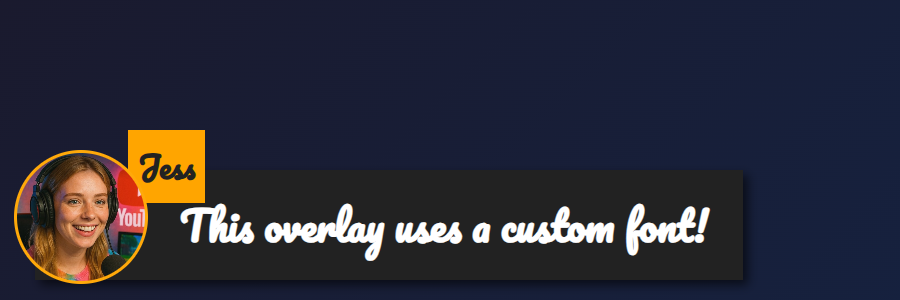
featured.html 叠加层,应用了 &googlefont=Pacifico 已应用 — 自行托管的字体也可通过以下方式使用: @font-face.你需要字体文件的直接 HTTPS 链接。请选择允许外链访问/CORS 的托管服务,让 OBS 或应用中的浏览器能够获取该文件。
使用以下规则定义字体: @font-face 并指向托管的文件,然后通过以下属性让叠加层使用它: --font-family.
@font-face {
  font-family: 'MyDockFont';
  src: url('https://your-site.example/fonts/MyDockFont.woff2') format('woff2');
  font-style: normal;
  font-weight: 400;
}

/* Optional second weight */
@font-face {
  font-family: 'MyDockFont';
  src: url('https://your-site.example/fonts/MyDockFont-Bold.woff2') format('woff2');
  font-style: normal;
  font-weight: 700;
}

:root {
  --font-family: 'MyDockFont', 'Segoe UI', 'Arial Unicode MS', sans-serif;
  --comment-font-size: 28px;
  --author-font-size: 24px;
  --message-line-height: 32px;
}
需要多种字体(例如亚美尼亚文、俄文和拉丁文)?分别声明每个 font-face,并在以下属性中列出: --font-family ,例如 'FontA', 'FontB', 'FontC', sans-serif。缺少某个字形时,浏览器会自动使用后备字体。
&css=https://your-site.example/my-font.css 到页面 URL:
https://socialstream.ninja/dock.html?session=YOURSESSION&css=https://your-site.example/my-font.css
https://socialstream.ninja/featured.html?session=YOURSESSION&css=https://your-site.example/my-font.css
&css= ,或使用以下参数传入 base64 编码的 CSS: &b64css= (两个页面均支持)。&font=YourInstalledFont 使用系统字体名称,而 &googlefont=Noto+Sans+Armenian,Noto+Sans 可加载 Google Fonts,适合不想自行托管的情况。这些选项在 Chrome 扩展、Electron 应用和托管网站中的工作方式相同,因为它们都加载相同的 dock.html/featured.html 文件。
两个页面使用的核心排版变量:
:root {
  --font-family: 'MyDockFont', 'FontB', sans-serif;
  --comment-font-size: 28px;  /* message text size */
  --author-font-size: 24px;   /* name text size */
  --comment-font-weight: 600; /* featured.html */
  --author-font-weight: 700;  /* featured.html */
  --message-font-weight: 500; /* dock.html */
  --name-font-weight: 700;    /* dock.html */
  --comment-color: #ffffff;
  --author-color: #ffe08a;
  --comment-bg-color: #161616;
  --author-bg-color: #202020;
}
仅适用于停靠面板的额外选项: --stylized-emoji, --stylized-img, --text-stroke-width, --text-shadow,以及行颜色(--highlight-base, --highlight-base2,再加上 compact 等变体)。
精选消息布局调整: 调整 --comment-width, --comment-padding, --comment-area-bottom,以及 --comment-area-height ,无需编辑 HTML 即可重新定位下三分之一字幕块。
将 CSS 更改与现有 URL 选项配合使用,例如 &scale, &compact,或 &hidesource ,用于调整停靠面板布局。
https://socialstream.ninja/fonts.html ,在测试时确认系统字体可见 &font=.@font-face 代码块和 --font-family;名称不匹配是最常见的问题。