
五步连接提醒
These steps connect Fourthwall, Ko-fi and Buy Me a Coffee. For signed membership alerts, follow the Patreon steps below.
- 打开 Monetization → Fourthwall, Ko-fi, Buy Me a Coffee & Patreon alerts 并选择你的 提供商.
- 点击 接收器设置 并开启 扩展的远程 API 控制.
- 返回 Monetization 并点击 复制 webhook URL.
- 粘贴到服务方的 Webhook 设置中,步骤如下。
- 保持 Social Stream Ninja 运行。
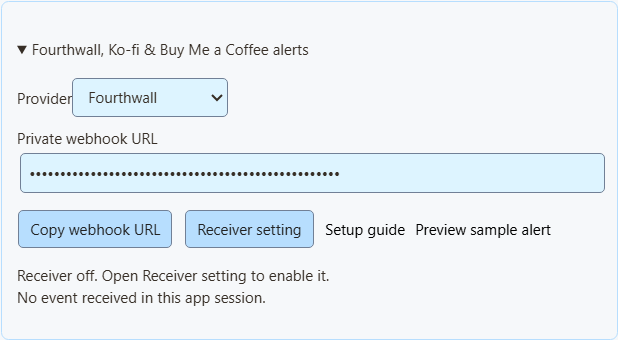
预览示例提醒 仅展示外观,不影响累计值、Event Flow 或 Webhook。
NinjaBacker、Throne、Amazon 和 eBay 请参阅 变现指南。Shopify 请参阅 Shopify 设置.
Fourthwall
- 在 Fourthwall 中打开 设置 → 开发者选项 → Webhooks.
- 创建 Webhook,粘贴 SSN 提供的 Fourthwall URL。
- 勾选所需事件,参见表格。
- 保存,并保持 SSN 运行。
| Fourthwall 事件 | 显示为 |
|---|---|
ORDER_PLACED | 购买。为兼容旧设置,仍会计入其捐款价值。 |
GIFT_PURCHASE | 礼物。 |
DONATION | 捐款。 |
SUBSCRIPTION_PURCHASED | 新会员。 |
礼品卡订单不会重复增加价值。测试事件会被跳过。
Ko-fi
- 打开 Ko-fi Webhooks.
- 将 SSN 的 Ko-fi URL 粘贴到 Webhook URL 并保存。
- 保持 SSN 运行。
公开打赏、会员、商店订单和委托都用同一个链接。私密付款会被排除。商店订单和委托显示为购买,不增加捐款累计值。Ko-fi 不报告已取消会员。
Buy Me a Coffee
- 在创作者控制台打开 集成 并选择 新建 webhook.
- 设置名称,粘贴 SSN 的 Buy Me a Coffee URL。
- 勾选所需事件,参见表格。
- 保存并保持投递开启。失败时在那里查看投递记录。
| 事件 | 显示为 |
|---|---|
donation.created | 捐款。 |
extra_purchase.created | 购买。 |
commission_order.created | 购买。 |
wishlist_payment.created | 礼物筹款贡献。 |
membership.started | 新会员公告,并非另一笔收费。 |
隐藏备注和匿名支持者保持隐藏。控制台测试(live_mode: false)会被跳过。退款不会减少累计值。
Patreon chat and new pledges
Use Standard capture for chat and connect a webhook for new-pledge alerts. You can use either on its own or both together.
Capture chat
In SSApp, add a Patreon source in 标准 mode, sign in with an account that can access the chat, and open the event or chat page. With the browser extension, enable Patreon capture and open that page in your browser. Keep the chat open and SSN on; new messages appear in your dock, while existing history is skipped.
Connect new-pledge alerts
- 打开 Monetization → Fourthwall, Ko-fi, Buy Me a Coffee & Patreon alerts,选择 Patreon,然后点击 复制 webhook URL. In SSApp, your Patreon source's Set up Patreon alerts menu item opens the same panel.
- Sign in to the creator account whose pledges you want to receive. Open Patreon webhook settings, create a webhook using the copied URL, and enable New pledge (
members:pledge:create). - Copy that webhook's signing secret into SSN's signing-secret field. Turn on Enable Patreon alerts 并点击 保存设置. Keep SSN running and switched on to display incoming pledges; the Patreon chat page does not need to stay open for these alerts.
- Open your dock or multi-alerts overlay using the same SSN session and password. Keep subscriber alerts enabled and allow the Patreon source. For automation, use Event Flow's New Subscriber trigger with Patreon 为选中状态。
Alerts show new pledges from the time you enable them. The tier and pledge amount appear when Patreon supplies them; hidden names remain Anonymous. Pledges do not increase donation totals. Free memberships, gifts, trials, declined/former memberships, upgrades, cancellations and recurring charges do not generate new-pledge alerts.
Patreon alerts use their own receiver; you do not need to enable remote API control of the extension. To show them in OBS, use your multi-alerts link or the Monetization activity-alert view. Patreon pledge alerts do not require an enabled product showcase.
Closing SSN or turning SSN off keeps pending pledges for up to seven days. Disabling Patreon alerts and saving clears the backlog and stops queuing new pledges. Disconnect removes the receiver; also remove its old webhook in Patreon before creating another connection.
Check the connection
预览示例提醒 checks the appearance without sending a webhook or firing Event Flow actions. To check delivery from Patreon, use Send Test on your webhook in Patreon's dashboard, then check SSN's status and last-event time. Dashboard tests can trigger alerts and Event Flow actions when the sample qualifies as a new pledge.
Verified event received; no eligible new pledge means the signature was accepted, but the event did not qualify for an alert. A dashboard sample with an old pledge date is skipped. Keep the members:pledge:create trigger enabled to receive new pledges after setup.
If Patreon reports 401 / Invalid signature, copy the complete signing secret from that same webhook, paste it into SSN, and save again. If SSN remains waiting for an event, check the webhook URL and selected trigger in Patreon. Keep the webhook URL and signing secret private.
导入 Fourthwall 商品
- 在 Fourthwall 中进入 设置 → 开发者选项 并创建 Storefront 令牌。不要使用管理员 API 密钥。
- 在 SSN 中打开 商品与支持链接 → 设置商品和链接 → 导入 Fourthwall 商品.
- 粘贴商品公开链接和令牌。点击 加载商品详情.
- 核对名称、图片、价格和链接。链接必须来自与令牌相同的商店。
- 选择用途:Shop、Gift、Support 或 Join。
- 点击 添加商品或链接,开启 商品与支持链接,然后点击 保存设置.
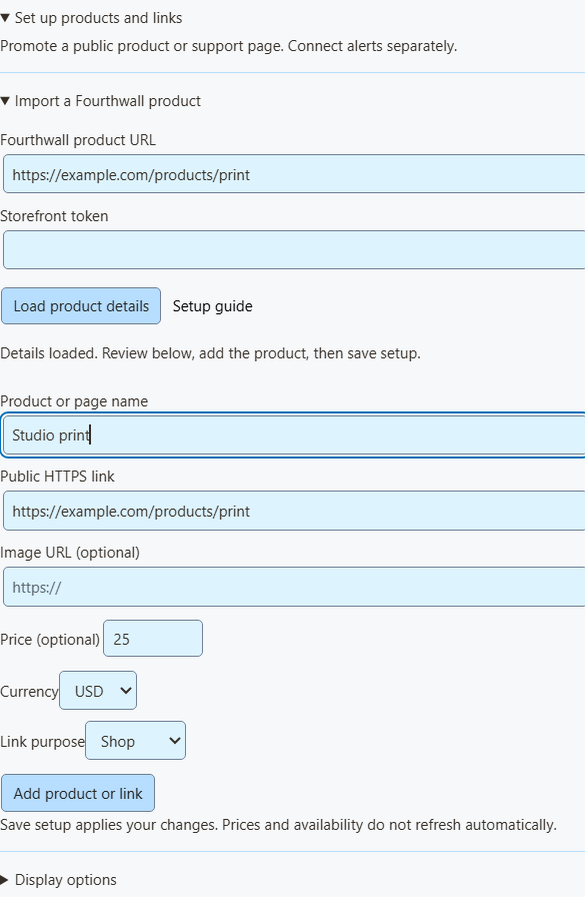
导入会做什么
- 每次加载一个公开、可购买的商品。
- 令牌决定搜索哪家商店。只使用一次,随后清除,不保存也不传给覆盖层。
- 若款式或套装价格不同,价格留空。
- 这是导入时的快照。价格、库存和图片不会自动更新,变化时请重新导入或编辑。
- 最多保存 20 个商品。再次添加相同商品会生成第二份。
在直播中显示商品和 QR 码
也可手动添加任何公开链接,例如 Shopify、Tiltify、Patreon。这不会连接付款提醒。
- 位于 OBS 覆盖层适用于,选择 商品与支持链接.
- 打开 叠加层链接选项 并选择 覆盖层视图:仅商品展示、仅支持卡片、仅活动提醒,或商品展示与提醒。
- 点击 复制 OBS 链接 ,然后作为以下来源添加到 OBS: 浏览器来源。从 800 × 600 开始,每种视图使用一个来源。
- 在 显示选项,固定第一个商品或轮换显示,并开启 显示二维码.
- 查看最终 OBS 布局时,用手机扫描 QR 码。
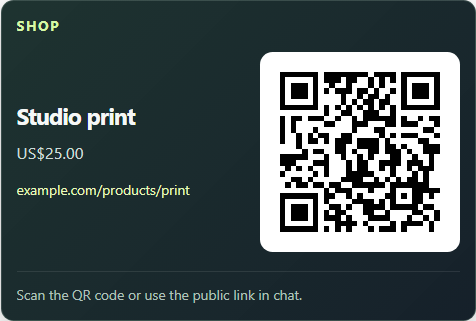
提醒、multi-alerts 与 Event Flow
- 商品展示会显示商品图片,较小的支持卡片不会。
- 活动提醒可独立使用,不会显示无关商品的 QR 码。
- Multi-alerts and the activity feed work with the same session, with no product list needed. The Monetization activity view needs the product list turned on for other providers; Patreon pledge alerts display independently.
- 在 Event Flow 中,Donation 触发器仍处理包含以下内容的行:
hasDonation。购买或已完成礼物请使用 Event Type。参阅 事件映射.
直播切换商品或共享一个观众链接,请参阅 实时商品控制.
如果没有显示任何内容
| 问题 | 试试这个 |
|---|---|
| 接收器已关闭 | For Patreon, turn on Enable Patreon alerts 并点击 保存设置. For Fourthwall, Ko-fi and Buy Me a Coffee, turn on 扩展的远程 API 控制. |
| 已断开 | 保持 SSN 开启并检查网络。这是 SSN 的连接状态,不是服务方的。 |
| 未收到事件 | 检查所选服务、URL 及服务方的 Webhook 设置。 |
| 事件被跳过 | 测试、私密付款、不支持的事件和无效金额会被排除。 |
| 事件已到达,但没有覆盖层 | 检查会话、密码、筛选器、SSN 规则及 OBS 来源是否可见。大多数购买不是捐款。 |
| 提醒显示两次 | 不要同时经由服务方和另一服务传送同一笔付款。 |
| 导入失败 | 检查商品链接、Storefront 令牌,以及商品是否公开且可用。也可手动输入。 |
This is a live alert feed, not an order record. Use your provider's dashboard for payments, refunds, and shipping. Tiltify alerts aren't supported yet.