
Set it up in 5 steps
No chat connected yet? Start here first.
- Open the SSN extension popup, or Sources and Settings in the desktop app.
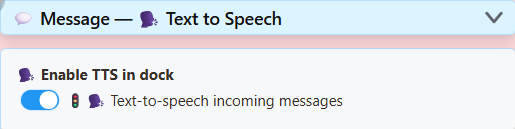
- Under Main chat overlay & control dock, expand Message – Text to Speech.
- Turn on Text-to-speech incoming messages.
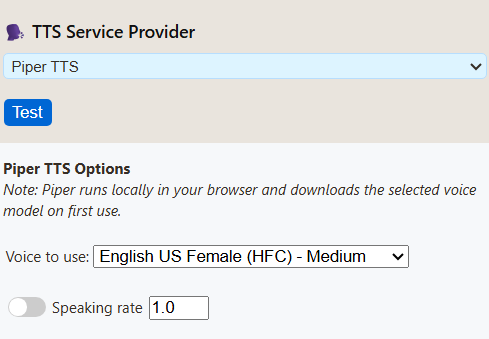
- Scroll to Text-to-Speech Service Provider. Pick Piper TTS, then a voice.
- Click copy link beside Main chat overlay & control dock.
Play it in OBS
- Add a Browser Source and paste the link you copied.
- In its properties, turn on Control audio via OBS.
- Send a chat message. The source's audio meter should move.
- Make a short test recording and play it back.
Hear the free voices
All four are free and run on your computer. Press play to compare.
Spanish and Portuguese samples
Pick a language above the voice list in SSN, then press Test. Piper has Spain, Mexico, Brazil and Portugal voices. Kokoro has three Spanish and three Brazilian Portuguese voices.
Piper - Spanish (Spain)
DaveFX
Kokoro - Spanish
Dora
Piper - Portuguese (Brazil)
Faber
Kokoro - Portuguese (Brazil)
Dora
Piper is the lighter choice. If Kokoro falls behind the chat, switch to Piper.
How these samples were made
The English samples read: Welcome to the stream! Thanks for joining us. Which game should we play next? Name reading was off. The clips skip loading time.
Tested September 7, 2026 in OBS 32.2.2 on Windows 11. A real chat message reached the dock, spoke, moved the Browser Source meter, and showed up in a recording. Kokoro took noticeably longer to start on CPU.
On that PC, System TTS listed five voices but made no sound in the OBS recording. Your PC may differ, so always test your own link. Cloud voices weren't tested (no paid accounts).
Pick a provider
Start with Piper. Try Kokoro if you like its sound better. Free voices run on your computer. Cloud voices need an account and API key, and your chat text is sent to that company.
| Provider | Good for | Keep in mind | Cost |
|---|---|---|---|
| Piper | Natural voices; English, Spanish, Portuguese. | Quality varies by voice. HFC medium is about 63 MB. | Free, no key |
| Kokoro | The most natural free voices; English, Spanish, Brazilian Portuguese. | Heavier on the CPU. First speech can be slow. Faster with a supported GPU. | Free, no key |
| Kitten | Small English model, eight voices. | English only. Bundled model is about 24 MB. | Free, no key |
| eSpeak | Very light, many languages, starts fast. | Sounds robotic on purpose. | Free, no key |
| System TTS | Voices already on your browser or PC. | Often silent in OBS. Some voices need internet. | Free |
| ElevenLabs | Pick voices by ID; stability and style controls. | Account limits and network delay. | API charges may apply |
| Google Cloud | Named voices; language, rate and pitch. | Not every voice supports every control. Cloud TTS API must be enabled. | Billing and quotas apply |
| Gemini | Voice styles and written delivery instructions. | Preview models and quotas can change. | Check your Gemini limits |
| Fish Audio | Free model with your own key; voice IDs. | OBS needs SSN's local bridge. | Free tier set by Fish Audio |
| Speechify | Voice ID with speed, language and model. | Voices depend on your account. | API terms apply |
| OpenAI | Named voices, model and format controls. | A ChatGPT subscription doesn't include API credit. | API billing |
| Custom / Local | Your own voice server. | Most setup. See the local server guide. | Your hardware or hosting |
Download sizes and OBS test notes
Sizes are model files only, not memory use. Free voices run on the computer playing the dock or overlay. First use is slower. OBS keeps its own download cache, separate from Chrome.
Piper, Kokoro, Kitten and eSpeak passed OBS Browser Source recording tests. Cloud and custom voices also play through the page, but weren't tested with live accounts. Test System TTS on its own, even if it lists voices.
Fix problems
| Problem | Try this |
|---|---|
| Does my chat platform support TTS? | Yes, if SSN gets the chat as text. YouTube, Twitch, TikTok and the rest all work the same way. The platform doesn't need its own TTS. |
| No speech at all | Check the dock shows chat. Then check the TTS switch, provider and filters. Use a freshly copied link. Let the first voice download finish. |
| Works in Chrome or Edge, not in OBS | OBS has its own browser and voice list. System TTS often fails there. Switch to Piper, Kokoro, Kitten or eSpeak. A virtual audio cable can't fix missing speech. |
| Meter moves, but the recording is silent | Check mute and the recording tracks in OBS. Don't capture the monitoring output a second time. See the OBS audio guide. |
| Speech falls behind chat | Switch from Kokoro to Piper, or try eSpeak. |
| Every message is read twice | More than one page is speaking. Keep TTS on in one place only. |
| I want an OBS dock or Featured Chat to speak instead | An OBS Custom Browser Dock is a control panel, not a scene source. For Featured Chat, turn on TTS in that overlay's own options and copy its link. |
More fixes: TTS reference · local server problems.
Provider settings
Real screenshots from the desktop app, with a fresh profile (key fields left empty). Open a provider to see its settings. Click a screenshot to enlarge it.
System TTS
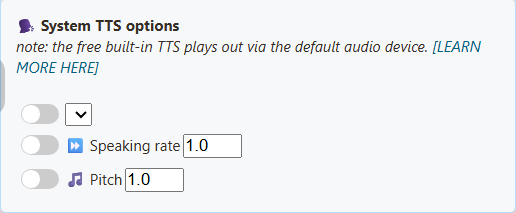
The voice list depends on your browser or app and the voices installed. There's no fixed SSN list. This fresh profile showed an empty language list.
Kokoro
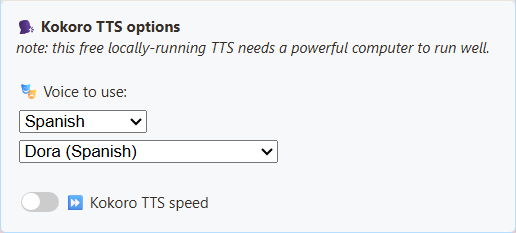
Pick a voice. Use the language filter to find one, and Test to hear it. The model loads on the page that speaks. Voices: US and UK English, Spanish, Brazilian Portuguese. Too slow? Try Piper.
Voice names and link values
- Heart (American Female):
af_heart - Alloy (American Female):
af_alloy - Aoede (American Female):
af_aoede - Bella (American Female):
af_bella - Jessica (American Female):
af_jessica - Kore (American Female):
af_kore - Nicole (American Female):
af_nicole - Nova (American Female):
af_nova - River (American Female):
af_river - Sarah (American Female):
af_sarah - Sky (American Female):
af_sky - Adam (American Male):
am_adam - Echo (American Male):
am_echo - Eric (American Male):
am_eric - Fenrir (American Male):
am_fenrir - Liam (American Male):
am_liam - Michael (American Male):
am_michael - Onyx (American Male):
am_onyx - Puck (American Male):
am_puck - Santa (American Male):
am_santa - Emma (British Female):
bf_emma - Isabella (British Female):
bf_isabella - George (British Male):
bm_george - Lewis (British Male):
bm_lewis - Alice (British Female):
bf_alice - Lily (British Female):
bf_lily - Daniel (British Male):
bm_daniel - Fable (British Male):
bm_fable - Dora (Spanish):
ef_dora - Alex (Spanish):
em_alex - Santa (Spanish):
em_santa - Dora (Brazilian Portuguese):
pf_dora - Alex (Brazilian Portuguese):
pm_alex - Santa (Brazilian Portuguese):
pm_santa
Kitten
Eight English voices: male and female versions of voices 2, 3, 4 and 5. The sample uses Voice 4 (Female).
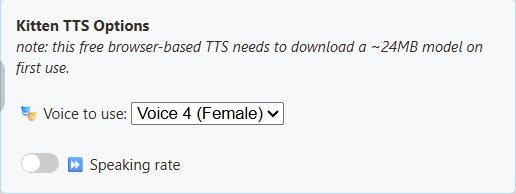
Voice names and link values
- Voice 2 (Male):
expr-voice-2-m - Voice 2 (Female):
expr-voice-2-f - Voice 3 (Male):
expr-voice-3-m - Voice 3 (Female):
expr-voice-3-f - Voice 4 (Male):
expr-voice-4-m - Voice 4 (Female):
expr-voice-4-f - Voice 5 (Male):
expr-voice-5-m - Voice 5 (Female):
expr-voice-5-f
Piper
Pick a voice that matches your language. Changing the language alone doesn't change the voice. The sample uses HFC medium.
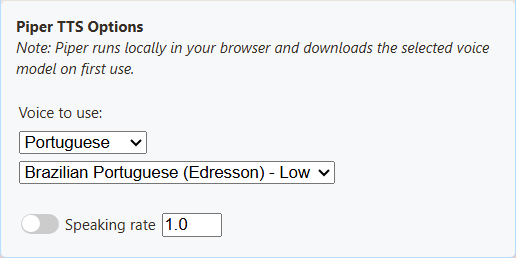
Voice names and link values
- English US Female (HFC) - Medium:
en_US-hfc_female-medium - Spanish Spain (DaveFX) - Medium:
es_ES-davefx-medium - Spanish Mexico (Ald) - Medium:
es_MX-ald-medium - Brazilian Portuguese (Faber) - Medium:
pt_BR-faber-medium - Brazilian Portuguese (Edresson) - Low:
pt_BR-edresson-low - Portuguese Portugal (Tugao) - Medium:
pt_PT-tugão-medium
eSpeak
Pick a language voice. You can change the speaking rate. It sounds robotic by design.
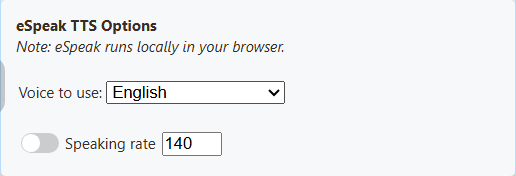
Voice names and link values
- English:
en - Spanish:
es - Portuguese Brazil:
pt-br - Portuguese Portugal:
pt-pt
ElevenLabs
Enter your API key. Then click List My Available Voices to find a voice ID your account can use. ElevenLabs reference.
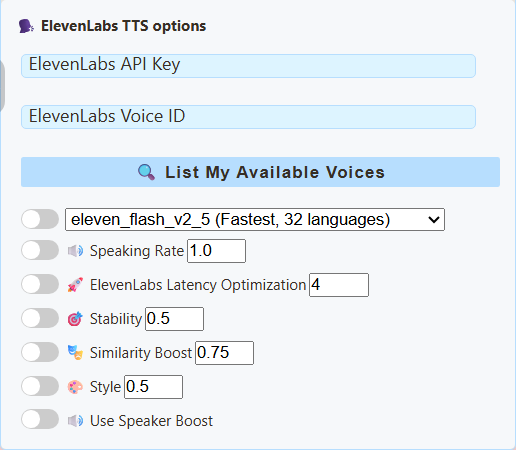
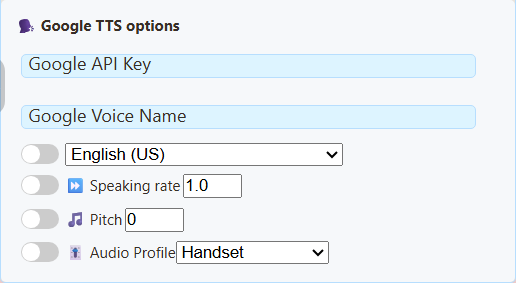
Google Cloud
Enter a Google Cloud TTS API key, the exact voice name, and its matching language. For Estonian, select an et-EE Chirp 3: HD voice, such as et-EE-Chirp3-HD-Aoede. The selected voice sets the request language, ahead of googlelang, speech, or ln. Chirp 3: HD voices do not use the rate and pitch controls. Voice names and supported controls.
Gemini
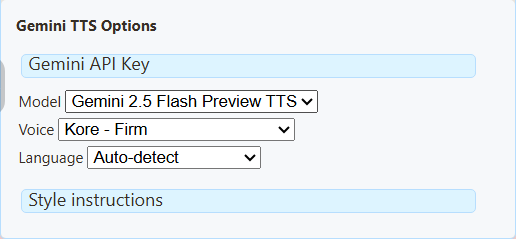
Pick a TTS model and voice. Style instructions change how it's read. This uses the Gemini API, not Google Cloud TTS. Voice examples and requirements.
Fish Audio
Works in the chat dock, featured overlay, TTS page and Flow Actions.
- Pick Fish Audio as the TTS provider.
- Paste your Fish Audio API key.
- Optional: paste a Voice ID from Fish Audio. Copy the voice's model ID, not its name or page link. Leave it blank for the default voice.
- Press Test TTS.
The default model is s2.1-pro-free. Fish Audio decides what's free and its fair-use terms. Paid models need account credit. SSN never switches to a paid model if a free request fails. Speed goes from 0.5 to 2. Fish Audio detects the language. Your chat text is sent to Fish Audio.
For OBS: run the local bridge
Fish Audio blocks direct requests from web pages, so OBS needs SSN's local bridge (Node.js required). Run it on the OBS computer.
- Set the
SSN_TTS_TARGET_BEARERenvironment variable to your Fish API key. - In the SSN folder, run
node scripts/local-tts-bridge.cjs --mode fish. Leave it running. - In the Fish Audio panel, set Bridge URL to
http://127.0.0.1:8124/v1/audio/speech. - Paste the bridge token shown in the terminal into the API Key field.
- Test the voice, then add the overlay link to OBS. Turn on Control audio via OBS.
SSN_TTS_BRIDGE_TOKEN to a long random secret. Keep links with a token or key private.Link settings for Fish Audio
&ttsprovider=fish&fishkey=YOUR_KEY&voicefish=VOICE_ID&fishmodel=s2.1-pro-free&fishspeed=1
With the bridge, add &fishendpoint=http%3A%2F%2F127.0.0.1%3A8124%2Fv1%2Faudio%2Fspeech. Leave out fishkey if the bridge holds your key. Event Flow's Speak Text voice override accepts a Fish voice ID when the receiving page uses Fish Audio.
Fish Audio API reference · Free model announcement and terms
Speechify
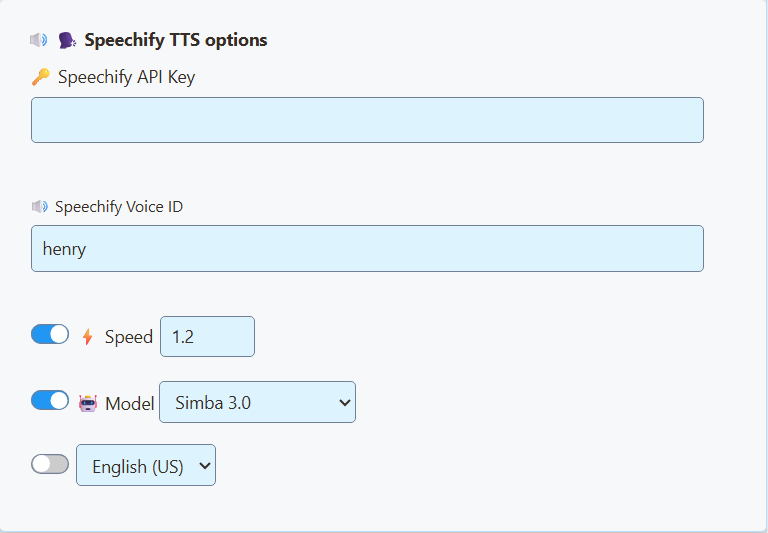
Enter the API key and voice ID from your Speechify API account. Step-by-step Speechify guide · Speechify setup.
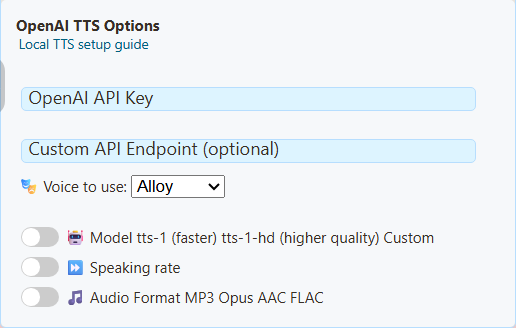
OpenAI
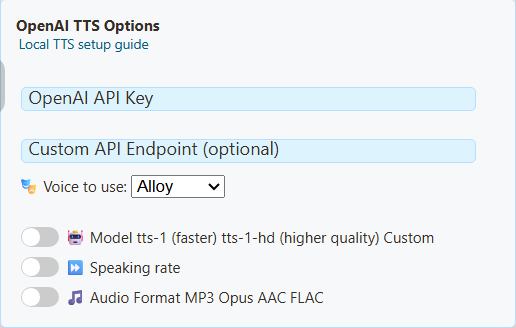
Pick a voice and model, and enter an API key. A ChatGPT subscription doesn't give you API credit. Keep the default endpoint.
Custom / Local TTS
This reuses the OpenAI settings, so the heading still says OpenAI. Enter your server's address and a voice and model it supports. Whether you need a key depends on your server. See the local server guide.
Faster Kokoro and Kitten
Under Kokoro or Kitten, open Generation and playback. These options make speech in the background so the page stays smooth.
| I want to… | Do this |
|---|---|
| Turn it on for Kokoro | Set Processing to Background generation. |
| Turn it on for Kitten | Pick a Kitten 0.8 model: Nano (smallest), Micro or Mini. |
| Hear speech sooner | Start as speech arrives. Plays each part as it's ready. Slow PCs may pause between parts. |
| Avoid gaps | Play complete message. Waits for the whole message first. |
| Fix GPU problems (Kokoro) | Set Background processor to CPU. |
| Best Kokoro quality | Full quality. Bigger download, more memory. |
More detail and link settings
Automatic uses a supported GPU if there is one, otherwise the CPU. Automatic quality picks FP16 on compatible GPUs, full precision on other supported GPUs, and the compact model on CPU. If you force GPU and none is available, you'll get an error.
Kitten 0.8 runs on the CPU, English only. Each model downloads on first use. Each browser or OBS keeps its own copy. NeuroSync gets the complete audio file either way. Old links keep working as before unless you change these options.
Kokoro: &kokororuntime=worker, optional &kokoroplayback=stream, &kokorodevice=wasm or webgpu, &kokorodtype=q8, fp16 or fp32. Streaming or FP32 turns on background generation automatically.
Kitten: &kittenmodel=nano (or micro, mini), optional &kittenplayback=stream.
Go further
| I want to… | Go here |
|---|---|
| Edit my TTS link by hand, or see every option | TTS reference |
| Use Spanish or Portuguese voices in a link | TTS reference: provider options |
| Run my own voice server, or clone a voice | Local AI TTS guide |
| Set up Speechify | Speechify guide |
A quick link to try: dock.html?session=YOUR_SESSION&speech=en-US&ttsprovider=piper